

Plug in your OBD dongle
Connect the dongle to your car’s OBD port. Your compatible iPhone or Android phone does the rest.
TRS PERFORMANCE / MOBILE TUNING
Choose your stage, match the map to your fuel and change supported settings from your phone.
Available settings depend on your vehicle and package.
CHOOSE YOUR PERFORMANCE
Choose your vehicle and stage to see its headline figures. Use the stage that suits your car and supporting hardware.
TRS Performance licence£400 + VAT
Purchased within the app. OBD dongle sold separately.
MK7 FIESTA ST · STAGE 1
For a standard or lightly modified Fiesta ST MK7.
SUPPORTING HARDWARE
No additional hardware is listed for Stage 1. Make sure your vehicle is in good condition and use the correct fuel map.
Figures are targets, not guarantees. Results depend on fuel, supporting hardware and vehicle condition.
CHANGE THE SETTINGS. KEEP THE CONTROL.
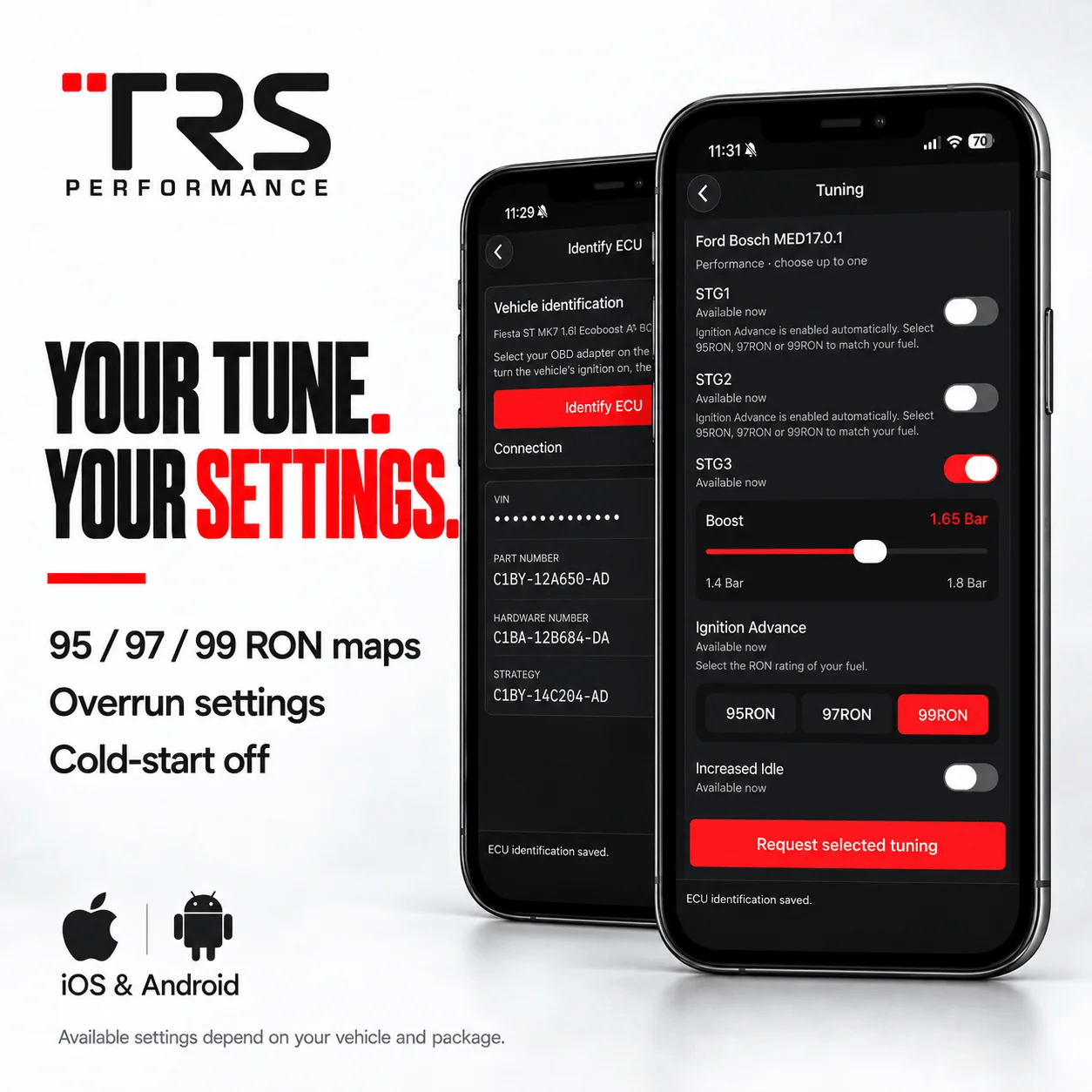
Explore what you can do in the TRS Performance app. Tap a feature to see the matching app screen.
YOUR SETUP. YOUR CHOICE.
Choose MK7 or MK8, select a stage and fuel map, and explore the supported settings. Scroll inside the demo to see every control. Your stage selection also updates the stage details on this page.
Interactive page preview only. It does not connect to or change your vehicle. Real tuning changes are made in the TRS app with a compatible OBD dongle.
Preview only · no vehicle connection
KNOW WHAT THE ECU IS TELLING YOU
Identify and read the ECU, check supported diagnostic trouble codes and access datalogging from the TRS app.
TRS PERFORMANCE / THE REAL APP
SET IT IN THE APP
Choose supported overrun behaviour and adjust available settings to suit your preference. Compatibility and available controls depend on your vehicle and package.
 TRS PERFORMANCE / THE REAL APP
GUIDED ECU FLASHING
Connect your OBD dongle and follow the app prompts with the car parked and engine off. Flash in around 1–2 minutes; initial setup takes longer.
 TRS PERFORMANCE / THE REAL APP
SEE WHAT YOUR CAR IS DOING
Use the app's live data and datalogging tools to capture supported channels from your vehicle. Available channels depend on ECU and app support.
 TRS PERFORMANCE / THE REAL APP
DATA WITH DIRECTION
View recorded datalogs and send them to TRS for review where the service is available. Follow the supplier's current instructions for log approval and support.
 TRS PERFORMANCE / THE REAL APP
YOUR ORIGINAL FILE
Restore the vehicle's original calibration through the app when required. A full stock restore typically takes around 5–8 minutes.
 TRS PERFORMANCE / THE REAL APP
YOUR PHONE. YOUR CAR. CONNECTED.
Calibration reflash time can vary. Initial setup takes longer; full stock restores take around 5–8 minutes.
Connect the dongle to your car’s OBD port. Your compatible iPhone or Android phone does the rest.
Select the calibration and settings for your stage, fuel and hardware.
Follow the guided flash with the car parked and engine off. Ready for a change later? Choose again and reflash.
OUR PREFERRED OBD DONGLE
This is our preferred OBD dongle as it supports High Speed CAN networking - the most stable device to use with our app.
ALSO SUPPORTED
We also support vLinker MS BT, although transfer speeds are much slower than the OBDlink MX+, but it works as a cheaper alternative. Because of the transfer rate, a battery stabiliser is highly recommended especially for MK8 Fiesta ST's
GOOD TO KNOW
You’ll need a supported OBD dongle and an active TRS Performance licence, priced at £400 + VAT and purchased within the app. The OBD dongle is sold separately. Our preferred dongle is the OBDLink MX+. We also support vLinker MS BT, although transfer speeds are much slower than the OBDlink MX+, but it works as a cheaper alternative. Because of the transfer rate, a battery stabiliser is highly recommended especially for MK8 Fiesta ST's
Android users can benefit from using USB dongles such as vLinker MS USB. This is the fastest method of reading, writing and datalogging, as it uses a wired connection. However, there is a greater risk of accidentally disconnecting the USB or OBD connection, so please take extra care when programming using a wired connection.
The app will work with Ford Fiesta ST MK7 1.6l Ecoboost and the Ford Fiesta ST MK8 1.5l Ecoboost vehicles. We support OBDLink MX+, vLinker MS BT and vLinker MS OBD. These listed OBD devices are fully compatible with our app and both supported vehicles.
The licence allows unlimited reflashes for the licensed car. Use the TRS app and a compatible OBD dongle, and follow the supplied instructions each time.
No. Make tuning changes with the vehicle parked and engine off. Follow the app's instructions and allow each flash to complete. Switchable maps seems great in theory, but they're limited to the hard coded switching, so once the map switching is set, that's it set in stone. With the new app and how it works you can constantly adjust based on what you require.
The app fully supports datalogging of both vehicles. Once logs are saved as .CSV and sent to us, - we can inspect and review the logs, and advise on any changes whether it be software or mechanical changes. Contact us on WhatsApp with any logs or changes you may require.
If you're the original purchaser of the old handheld device, we're offering an upgrade to the new app (without having to pay for a full license), this upgrade cost is £200+VAT. With that you'll unlock the core apps features and available tuning for your vehicle. Arrange your £200+VAT upgrade on WhatsApp.
Thanks for subscribing!
This email has been registered!